POP3 Email Accounts
Every web hosting plan we offer includes Email Accounts. The most common way to access these email accounts is using the POP3 mail protocol. So often times, when someone refers to Email Accounts they are called POP3 Email Accounts.
Our POP3 Email Accounts can be used with all modern Email software packages. This includes popular packages like Outlook Express, Netscape Mail, and Eudora.
Setup and Managing your Email Accounts
All of our web hosting plans come with Email Accounts. Using our CPanel Control Panel you can create, manage and configure your Email Accounts quickly and easily. No special configuration is required. Everything is done directly through the web based CPanel Control Panel. We've included a screenshot of the CPanel interface you will use to setup your accounts below. Just click the image to see a full size version of the image:
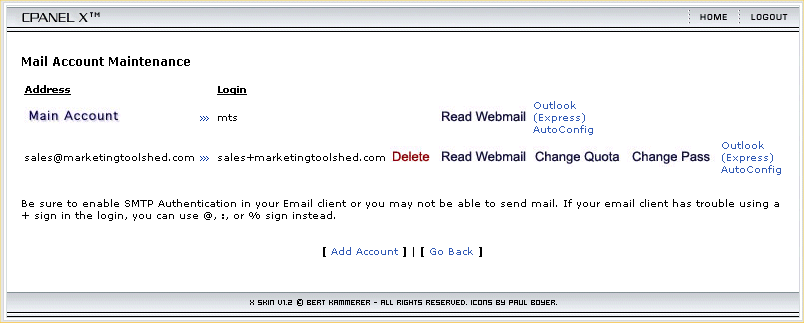
Using this interface, you can setup all your email accounts for your web site. Here are a few examples of email accounts you could setup:
- sales@yoursite.com
- webmaster@yoursite.com
- your-name@yoursite.com
- another-name@yoursite.com
- ... etc
Each email account you create will have its own unique password. In addition, you can setup a disk quota limit, so that one email account doesn't use too much disk space in your account.
Catch-all Email Account
In CPanel you can setup one of your email accounts as the "Catch-all" or "Default" email account.
Catch-all Email Account can be a very convenient feature. A Catch-all email account can receive any email that is not sent to an account at your domain name where an email account is not already set up. For instance, if one of your addresses is john@yourdomain.com, and someone sends you an email to jon@yourdomain.com, your Catch-all email account will receive the mis-directed email.
<%@ include file="/ssi/learn-about-sales-links.jsp" %>