.htaccess Files
All of our Web Hosting plans include the ability to use .htaccess files. As you may already know, .htaccess files are used for many purposes. Some examples of uses for .htaccess files include:
- .htaccess Password protection: Protect files and folders using .htaccess files.
- Redirecting users using mod_rewrite: You can configure special redirects using mod_rewrite rules in .htaccess files.
- Setting up custom error pages
- and more....
If your comfortable doing it you can custom create all of your .htaccess files by hand. It does take some expertise and can take a lot of work but it the flexibility to configure .htaccess can be very handy.
If you plan on working with your htaccess files by hand, we recommend reviewing the Apache documentation.
Password Protection
One of the most common uses of .htaccess files is to configure Password Protection on web site files or directories. We provide a very simple way to Password Protect files and directories. The CPanel Control Panel software we include with our web hosting plans, contains a simple web-based interface to manage password protected files and directories.
The CPanel Control Panel does all the code creation and password management for you. It creates all of the .htaccess and password files you need to password protect your files or directories within your web site.
Take a look at this screenshot below. It shows you how simple the CPanel software makes password protecting directories:
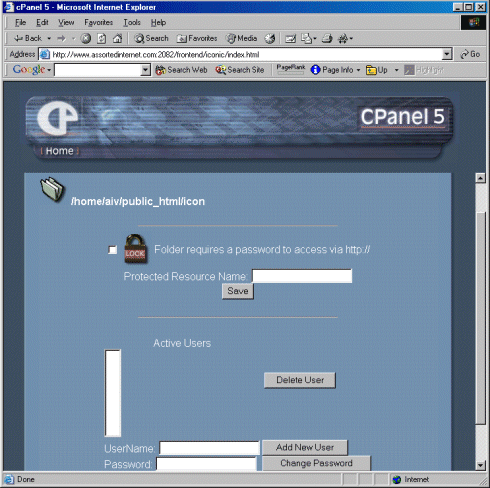
No special configuration is required. CPanel handles everything for you. You can of course manually edit the produced .htaccess files as you see fit, but its not required.
<%@ include file="/ssi/learn-about-sales-links.jsp" %>