Free Counter CGI Script
We include with every web hosting plan free Counter CGI Script, pre-installed and ready to use. Our free Counter CGI Script is extremely robust, flexible and simple to setup. You can setup your hit counter using different colors, shapes, fonts, sizes and effects to meet your individual tastes. Also, you can reset the counter value or start the counter at whatever value you want. You will be able to manage your counters via a simple web based GUI in your web site Control Panel. Here is a screenshot of the GUI you will use to manage your hit counter:
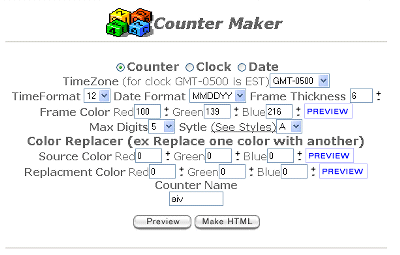
Using the GUI, once you've decided on a counter style, just click the "Make HTML" button then copy and paste the provided HTML into your web page. That is all that's required, and your counter will be up and running.
Here are just a few examples of the different styles you can create:
With some other web hosts, if you wanted a CGI counter on your web site, you would be on your own. First, you would need to find your own script. Once you find it, you would need to download it, then upload it to the server. Then figure out how to install and configure the script. Finally once all that is done, you would need to test it and hope that it works properly.
That can be a lot of work - especially if your not familiar with CGI Scripting or UNIX. But with us, you won't have to do all that work. All of our web hosting plans include as a standard feature a powerful, free Counter CGI Script installed and ready to use.
<%@ include file="/ssi/learn-about-sales-links.jsp" %>