How It Works
The CGI Download Manager is a complex script with thousands of lines of code and more than 4 years of testing and development behind it.
Optimized for Speed
Perl based CGI scripts can be slow. A busy site based on Perl and CGI can slow down or crash a web server.
With this in mind, we designed the CGI Download Manager to optimize speed. To do so, we minimized the need to run the script itself. The diagram below shows how we did this:
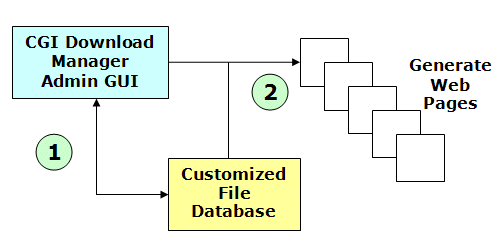
The heart of the system is the Admin Interface. In the Admin Interface the user does all of the work:
- Creating file records,
- Organizing and categorizing files
- Fixing broken links,
- Uploading files,
- etc.
The user working in the Admin Interface is represented by (1) on the diagram above. Here the user is adding to and managing data in the script's customized file database.
Once the user has finished their work, they then click the Generate Web Pages button in the Admin Interface. When the user clicks Generate Web Pages - the CGI Download Manager creates the actual download pages of your web site. This step is shown by (2) on the diagram. Here the script takes the data in the cusomized file database and uses it to generate all of the pages for each category of files and each file itself.
The pages the script creates are static HTML files. (Note: The script can be configured to create ANY type of page, PHP, JSP, ASP, etc.) The web server can serve these static HTML files far faster than it can execute a CGI Script. That is why we chose this approach. It offers the best performance possible.
The Slow Alternative
If we had chose the alternate approach - having the CGI Download Manager regenerate each page dynamically the script and the download pages would be far, far slower. Using this approach would require the script to do a lot of work just to display one page. The table below shows a comparison of the different approaches. It shows what the server must do to serve a page in our approach versus the alternate approach we are talking about here.
|
|
|
|
| Page Generation: | Pages are regenerated once, only on demand by the webmaster. | Every page would be generated on the fly |
| Page Delivery: |
Since pages are pregenerated by the webmaster, the web server simply:
|
Since pages would be regenerated by the script on request, the web server would have to do all this to serve 1 request:
|
| Load Times: | Very Low | High |
| User Capacity: | Very High | Limited due to CGI Overhead |
| Search Engine Friendly: |
Yes Page URL's contain descriptive text/words |
No Page URL's contain cryptic parameters/ids. Most search engines cannot parse these. |
This is why we designed the CGI Download Manager to generate the file download pages. Since they are generated only on request, there is only one delay. Once generated, the pages load as fast as any web page on your web site. This is the optimum choice for speed and flexibility.
Web Based Admin Interface
Managing file downloads is a tedious and time consuming task. The whole impetus behind the CGI Download Manager is to allow the webmaster to manage a set of file downloads as easy as possible.
To that end, we designed the CGI Download Manager to use a very simple web based interface for management of your file downloads. Every function you need to handle is done through the GUI. This includes adding files, categorizing files, updating dead links, uploading new files and more. You'll never need to login to the web server, edit HTML, or deal with UNIX. The script does all the work - you just use the web interface.
Highly Customized File Database
Back when the CGI Download Manager was first created in 2000 - it was very expensive to get web hosting with any kind of SQL Database. So - it was designed to not need a SQL Database.
The CGI Download Manager uses its own highly customized file system based data storage system. The data storage system is easily read by a human, if for some reason you wanted to modify it. Plus, since its stored in regular files on the file system, it is easily backed up using tar, gzip and other common UNIX file system tools. There is also a backup mechanism built into the Admin Interface.
Links
Ready to Order? Place your order today! Then visit our download area to download the script. Complete installation instructions are provided.
Want to try it out? Give our Hands On Demo a try!
Want to see a live example site? Check out CGIScriptDepot.com to see a live site powered by the CGI Download Manager.
Want to see if it does something specific? Check out the complete feature list.
Want to learn how it works? We have a How It Works page just for you!
Got Questions? Visit our FAQ section. We answer most common questions here.